Page Guide
Start with the short answer, then follow the mechanism
Wi-Fi works by encoding digital information onto radio waves that travel between your device and a router or access point, with performance shaped by distance, obstacles, and channel crowding.
These explainers turn common hardware into systems you can reason about instead of just accept as black boxes.
Interactive Explainer
How does Wi-Fi work?
Wi-Fi is a way of sending digital information through radio waves between devices and a wireless access point or router. The data gets encoded into changes in those radio signals, then decoded on the other side. The basic idea is elegant, but the real-world result depends heavily on distance, obstacles, and competing signals.
Wi-Fi works by encoding data onto radio waves that travel between your device and a router or access point.
Radio signals weaken with distance and lose quality when walls, floors, and furniture absorb or scatter them.
Many nearby networks and devices compete in overlapping frequency space, which can reduce speed and stability.
Short Answer
Short answer: How does Wi-Fi work?
Wi-Fi works by encoding digital information onto radio waves that travel between your device and a router or access point, with performance shaped by distance, obstacles, and channel crowding.
The sections below unpack the main mechanism, the conditions that change the answer, and the follow-up questions readers usually ask next.
Closest next questions: how does bluetooth work?, how do touchscreens work?, how does a microwave work?
Short answer
Wi-Fi is a local radio link for moving data between devices and an access point.
Why walls matter
Distance and building materials weaken and scramble the radio path.
Why busy apartments feel worse
Shared spectrum means many nearby devices can compete for the same wireless space.
Also Asked As
Other ways people ask how does wi-fi work
This page is meant to catch the close variants, common misconceptions, and next-step versions of the same question without forcing readers back to search.
Closest dedicated pages: how does bluetooth work?, how do touchscreens work?, how does a microwave work?
Choose The Closest Version
If your real question branches from here, start with the closest next page
This is the fastest way to keep the visit useful. The answer stays on-topic, and the next click stays close to what the reader actually meant.
A Bluetooth lab that lets you change distance, interference, battery power, and antenna alignment to compare a stable link with a flaky one.
If you want the screen-sensing version of invisible signals How do touchscreens work?A touchscreen lab that lets you change contact, conductivity, moisture, and barrier thickness to compare reliable taps with missed or noisy touches.
If you want radio waves heating food instead of carrying data How does a microwave work?A microwave lab that lets you change power, water content, thickness, and stirring or resting to compare even heating with frustrating cold centers and hot edges.
If you want the heat-moving appliance version How does refrigeration work?A refrigeration lab that lets you change compressor strength, refrigerant flow, airflow, and door openings to compare steady cooling with a struggling overworked fridge.
Why Trust This Answer
Why trust how does wi-fi work
This sits near the top on purpose so readers can see how the page was reviewed before they decide whether to keep going.
Review summary
How this page was checked
Reviewed against the listed TechTarget and Wi-Fi Alliance references for the local-radio, access-point, and shared-spectrum explanations on this page.
Key sources
The first places to check behind this answer
Keep The Question Moving
The next questions readers usually ask from here
This keeps the visit useful instead of one-and-done. You can branch into the next natural follow-up or open the closest dedicated explainer without losing the thread.
Small moves can change the signal path, reduce obstacle loss, and improve how reflections combine at the device.
Jump to the FAQThere may be less interference or less local network usage competing for the same wireless space.
Jump to the FAQA touchscreen lab that lets you change contact, conductivity, moisture, and barrier thickness to compare reliable taps with missed or noisy touches.
Open explainerA GPS lab that lets you change satellite view, timing quality, sky openness, and reflections to compare an accurate fix with an error-prone one.
Open explainerMyth Check
Is Wi-Fi the same thing as the internet?
No. Wi-Fi is the short-range wireless link inside your home, school, or office. The internet is the larger network beyond that local link.
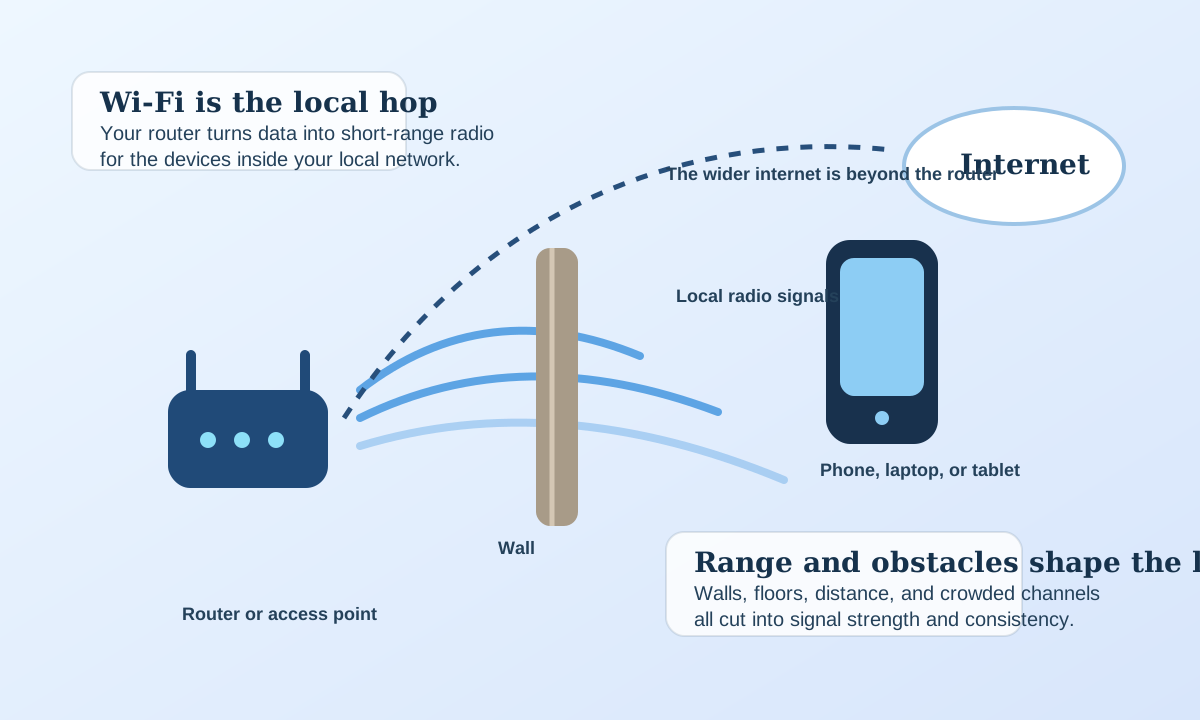
You can have Wi-Fi without internet
A router can still create a local wireless network even if the wider internet connection is down, which is why printers, smart-home devices, or local file sharing can keep working when the internet fails.
The radio path is only one part of the experience
A strong Wi-Fi signal cannot fix a slow internet service beyond the router, and a great internet plan cannot feel good if the local radio link is weak or crowded.
Try It Yourself
Wi-Fi Signal Lab
Move the device closer, open the path, clear the channel, or upgrade the router to see when a connection feels fast and when it starts dropping packets.
Move the controls or load a preset to see how the system responds.
What changes the fastest
What is driving the result
The Big Idea
How does Wi-Fi work
Learn how Wi-Fi turns data into radio signals, why walls and crowding weaken it, and why Wi-Fi is not the same thing as the internet.
The router encodes data onto radio waves
Your router changes the signal in carefully controlled ways so that 1s and 0s can be represented and recovered.
The signal travels through the local environment
Those waves spread outward, bounce off objects, pass through some materials, and get weakened by distance.
Your device measures and decodes the signal
The phone, laptop, or tablet extracts the intended data as long as the signal is strong and clean enough.
Both sides keep adapting as conditions change
Modern Wi-Fi systems shift rates, retry packets, and negotiate conditions continuously to hold the connection together.
Follow-Up Answer
Why can faster Wi-Fi bands feel quicker nearby but weaker farther away?
The tradeoff is not “good versus bad Wi-Fi.” It is usually capacity and cleanliness versus range and penetration.
Higher-capacity bands can shine at short range
Cleaner, wider channels can support more data when the path is strong, which is why nearby devices often see the highest speeds on the less-congested higher-frequency options.
Obstacles cost more as the path gets harder
Once walls, floors, and distance pile up, the link margin shrinks quickly and the “faster” option may stop feeling faster at all because the radio path is struggling.
Good Follow-Up Questions
How does Wi-Fi work: edge cases and follow-up questions
The short answer helps, but the edge cases, tradeoffs, and scene changes are what usually make the topic memorable.
Faster Wi-Fi is not only about raw router power
Placement, local interference, and how open the signal path is often matter just as much.
A network can feel slow even when it is still connected
Packets may be getting through, but retries, weaker modulation, and congestion can drag down the user experience.
Your home is a radio environment, not empty space
Walls, appliances, mirrors, and neighboring networks all help shape the path your wireless data has to survive.
Compare Scenes
The same router can feel brilliant in one room and disappointing in another
Distance, path clarity, and interference determine whether the device sees a clean high-capacity signal or a compromised one.
Short clean path
A device near the router
With strong signal strength and relatively few obstacles, the connection can use higher data rates and stay stable.
Same room
A device near the router
With strong signal strength and relatively few obstacles, the connection can use higher data rates and stay stable.
Through walls
A device in another room behind obstacles
The signal still arrives, but weaker and messier, so speed often drops and stability becomes more fragile.
Crowded
A network in a busy radio neighborhood
Even decent signal strength can feel worse when too many nearby devices and networks are contending for similar channels.
Fast Answers
How does Wi-Fi work? FAQ
Good science pages should answer the obvious follow-ups without making the reader hunt for them.
If your real question is closer to how does bluetooth work?, that page covers the narrower version directly.
If your real question is closer to how do touchscreens work?, that page covers the narrower version directly.
If your real question is closer to how does a microwave work?, that page covers the narrower version directly.
If your real question is closer to how does refrigeration work?, that page covers the narrower version directly.
Trust And Further Reading
Sources and review notes for how does wi-fi work
Reviewed against the listed TechTarget and Wi-Fi Alliance references for the local-radio, access-point, and shared-spectrum explanations on this page. This page also links outward to trusted references and inward to nearby explainers on the same topic path.
Editorial review
How this page was reviewed
Reviewed against the listed TechTarget and Wi-Fi Alliance references for the local-radio, access-point, and shared-spectrum explanations on this page.
Further reading
Trusted places to continue learning
Stay In This Topic
More from Everyday Engineering
Signals, circuits, refrigeration, and other engineering ideas hiding in ordinary tools and devices.
A microwave lab that lets you change power, water content, thickness, and stirring or resting to compare even heating with frustrating cold centers and hot edges.
Everyday Engineering How do touchscreens work?A touchscreen lab that lets you change contact, conductivity, moisture, and barrier thickness to compare reliable taps with missed or noisy touches.
Everyday Engineering How do GPS satellites work?A GPS lab that lets you change satellite view, timing quality, sky openness, and reflections to compare an accurate fix with an error-prone one.
Everyday Engineering How do microphones work?A microphone lab that lets you change sound level, diaphragm response, magnet strength, and background noise to compare clean voice capture with noisy or overloaded audio.
Related Public Questions
Questions people on the site are also asking
This keeps the explainer connected to the rest of the archive instead of feeling like an isolated page.
No close public question matches are cached yet, but the search page is a good next stop if you want to explore the archive from this starting point.