Page Guide
Start with the short answer, then follow the mechanism
Bluetooth works by sending digital information over short-range radio between paired devices that coordinate timing, channel use, and power to keep a nearby connection synchronized.
These explainers turn common hardware into systems you can reason about instead of just accept as black boxes.
Interactive Explainer
How does Bluetooth work?
Bluetooth is a short-range radio system for linking nearby devices. Once paired, the devices coordinate how to encode data onto radio waves, hop among channels to reduce conflicts, and keep the connection synchronized while using relatively little power.
Bluetooth works by sending digital information over short-range radio between paired devices that coordinate timing and channel use.
Bluetooth is designed for modest-power nearby connections rather than long-distance networking.
Other devices using nearby frequencies, physical obstacles, and weak battery conditions can all make the radio link less reliable.
Short Answer
Short answer: How does Bluetooth work?
Bluetooth works by sending digital information over short-range radio between paired devices that coordinate timing, channel use, and power to keep a nearby connection synchronized.
The sections below unpack the main mechanism, the conditions that change the answer, and the follow-up questions readers usually ask next.
Closest next questions: how does wi-fi work?, how do touchscreens work?, how does a microwave work?
Short answer
Bluetooth is a short-range radio link between nearby paired devices.
Why it stays short-range
It is designed for modest-power local links rather than whole-home networking.
Why interference matters
Distance, radio crowding, and weak link support can quickly erode stability.
Also Asked As
Other ways people ask how does bluetooth work
This page is meant to catch the close variants, common misconceptions, and next-step versions of the same question without forcing readers back to search.
Closest dedicated pages: how does wi-fi work?, how do touchscreens work?, how does a microwave work?
Choose The Closest Version
If your real question branches from here, start with the closest next page
This is the fastest way to keep the visit useful. The answer stays on-topic, and the next click stays close to what the reader actually meant.
A Wi-Fi lab that lets you change closeness, openness, channel crowding, and router quality to compare a strong connection with a frustrating weak one.
If you want the screen-sensing version of invisible signals How do touchscreens work?A touchscreen lab that lets you change contact, conductivity, moisture, and barrier thickness to compare reliable taps with missed or noisy touches.
If you want radio waves heating food instead of carrying data How does a microwave work?A microwave lab that lets you change power, water content, thickness, and stirring or resting to compare even heating with frustrating cold centers and hot edges.
If you want the heat-moving appliance version How does refrigeration work?A refrigeration lab that lets you change compressor strength, refrigerant flow, airflow, and door openings to compare steady cooling with a struggling overworked fridge.
Why Trust This Answer
Why trust how does bluetooth work
This sits near the top on purpose so readers can see how the page was reviewed before they decide whether to keep going.
Review summary
How this page was checked
Reviewed against the listed Bluetooth SIG references for the pairing, short-range radio, and frequency-management explanations on this page.
Key sources
The first places to check behind this answer
Keep The Question Moving
The next questions readers usually ask from here
This keeps the visit useful instead of one-and-done. You can branch into the next natural follow-up or open the closest dedicated explainer without losing the thread.
Pairing lets the devices recognize each other and establish the information they need to create a trusted connection.
Jump to the FAQMore radio activity means more competition and more chances for the signal to be disrupted or to need retries.
Jump to the FAQA Wi-Fi lab that lets you change closeness, openness, channel crowding, and router quality to compare a strong connection with a frustrating weak one.
Open explainerA touchscreen lab that lets you change contact, conductivity, moisture, and barrier thickness to compare reliable taps with missed or noisy touches.
Open explainerMyth Check
Is Bluetooth basically the same thing as Wi-Fi?
They both use radio, but they are built for different jobs. Bluetooth is optimized for nearby low-power links, while Wi-Fi is usually optimized for local networking and internet access.
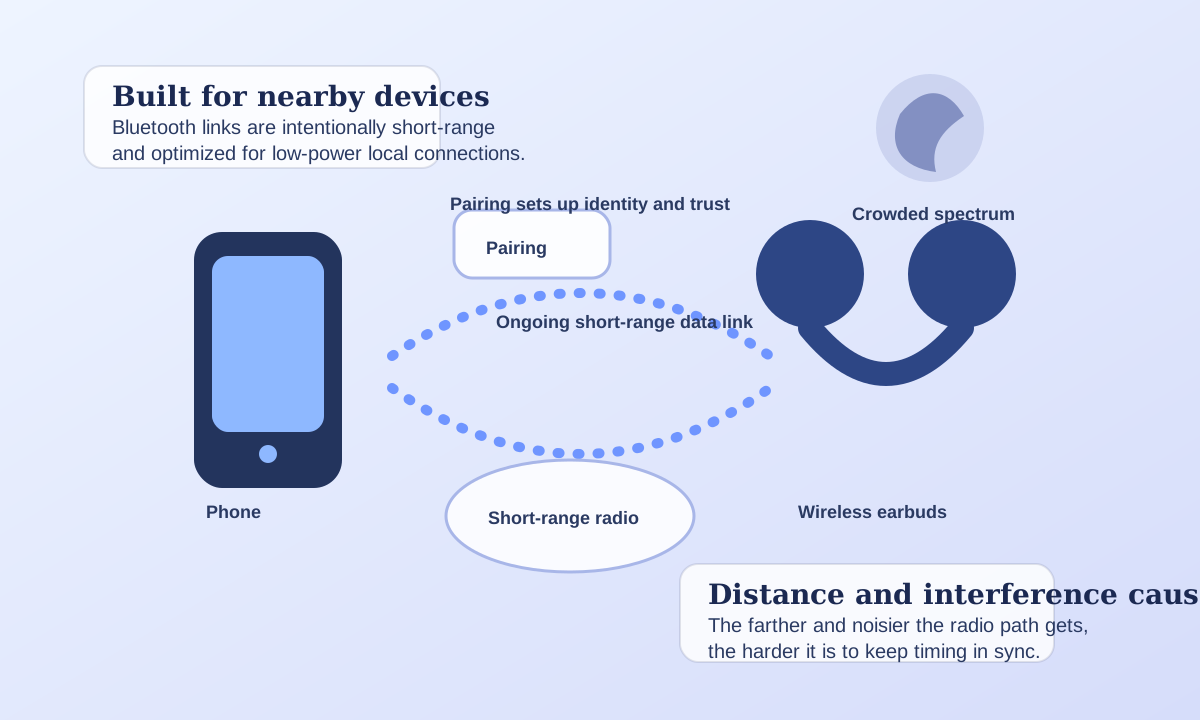
Bluetooth stays local on purpose
That short-range design is a feature, not a flaw. It lets devices like earbuds, keyboards, watches, and sensors stay connected without paying the power and complexity costs of a bigger network.
The shared spectrum still matters
Because Bluetooth lives in busy wireless neighborhoods, it has to manage timing and frequency use carefully to avoid becoming flaky in crowded places.
Try It Yourself
Bluetooth Link Lab
Move the devices closer, improve alignment, or cut interference to see when the radio link stays smooth and when it starts dropping data.
Move the controls or load a preset to see how the system responds.
What changes the fastest
What is driving the result
The Big Idea
How does Bluetooth work
Learn how Bluetooth sends data between paired devices, what pairing actually does, and why distance and interference cause dropouts.
Devices pair and agree on a link
Bluetooth devices first establish a trusted connection and decide how to exchange information.
Data gets encoded onto radio waves
The sending device turns digital information into changes in a radio signal that the receiver can interpret.
The devices manage channels and timing
Bluetooth coordinates short transmissions and channel changes to keep the connection reliable in shared spectrum.
The receiver reconstructs the original data
As long as the signal remains strong and clean enough, the receiving device decodes the radio changes back into digital information.
Follow-Up Answer
What does Bluetooth pairing actually do?
Pairing is the setup phase that lets devices recognize each other and agree on how to create a trusted link later.
It establishes identity and trust
The devices exchange the information they need so that future connections can happen quickly and with the right device rather than any random nearby radio source.
Pairing is not the whole radio conversation
After pairing, the devices still have to maintain timing, manage channels, and survive interference during the actual data exchange.
Good Follow-Up Questions
How does Bluetooth work: edge cases and follow-up questions
The short answer helps, but the edge cases, tradeoffs, and scene changes are what usually make the topic memorable.
Bluetooth is a local link, not the whole network
It is designed for nearby device-to-device communication, often to replace cables over short distances.
Frequency management helps it survive busy environments
By changing where and when it transmits, Bluetooth can work around some conflicts instead of sitting on one fixed channel all the time.
A connection can stay paired even while quality drops
Devices may still know each other, but poor radio conditions can lower stability, latency, or throughput.
Compare Scenes
The same Bluetooth device can feel rock-solid or unreliable
Distance, spectral crowding, and link quality determine whether the radio exchange stays smooth.
Comfortable radio path
Earbuds a short distance from a phone
The signal path is short and clean enough that the devices can stay synchronized and exchange data smoothly.
Nearby
Earbuds a short distance from a phone
The signal path is short and clean enough that the devices can stay synchronized and exchange data smoothly.
Crowded
A connection in a busy room full of devices
The devices still communicate, but the surrounding radio activity makes the link more fragile and less efficient.
Weak
A distant or poorly aligned Bluetooth link
The connection struggles because the signal is weak, power support is limited, and interference has less margin to spare.
Fast Answers
How does Bluetooth work? FAQ
Good science pages should answer the obvious follow-ups without making the reader hunt for them.
If your real question is closer to how does wi-fi work?, that page covers the narrower version directly.
If your real question is closer to how do touchscreens work?, that page covers the narrower version directly.
If your real question is closer to how does a microwave work?, that page covers the narrower version directly.
If your real question is closer to how does refrigeration work?, that page covers the narrower version directly.
Trust And Further Reading
Sources and review notes for how does bluetooth work
Reviewed against the listed Bluetooth SIG references for the pairing, short-range radio, and frequency-management explanations on this page. This page also links outward to trusted references and inward to nearby explainers on the same topic path.
Editorial review
How this page was reviewed
Reviewed against the listed Bluetooth SIG references for the pairing, short-range radio, and frequency-management explanations on this page.
Further reading
Trusted places to continue learning
Stay In This Topic
More from Everyday Engineering
Signals, circuits, refrigeration, and other engineering ideas hiding in ordinary tools and devices.
A noise-canceling lab that lets you change microphone quality, cancellation match, steady-noise level, and ear seal to compare calm silence with messy leftover noise.
Everyday Engineering How do vacuum cleaners work?A vacuum lab that lets you change motor power, airflow seal, nozzle distance, and filter clogging to compare strong pickup with weak dusty performance.
Everyday Engineering How do speakers work?A speaker lab that lets you change signal strength, magnet force, cone size, and damping to compare clean sound with weak or distorted playback.
Everyday Engineering How do solar panels work?A solar lab that lets you change sunlight, panel angle, shading, and heat to compare strong rooftop generation with a weak underperforming panel.
Related Public Questions
Questions people on the site are also asking
This keeps the explainer connected to the rest of the archive instead of feeling like an isolated page.
No close public question matches are cached yet, but the search page is a good next stop if you want to explore the archive from this starting point.