Page Guide
Start with the short answer, then follow the mechanism
Most modern touchscreens work by sensing how a conductive fingertip changes an electric field near the glass, then using electronics to estimate where that disturbance happened.
These explainers turn common hardware into systems you can reason about instead of just accept as black boxes.
Interactive Explainer
How do touchscreens work?
Most modern phone and tablet screens are capacitive touchscreens. They maintain an electric field near the glass surface, and when a conductive object such as your finger approaches, it changes that field slightly. Electronics beneath the screen measure the change and infer where the touch happened.
Touchscreens usually work by sensing how your finger changes a carefully measured electric field near the glass.
A thick nonconductive barrier can weaken the field disturbance enough that the screen cannot confidently detect the touch.
Water can create extra conductive paths or false signals, which is why moisture sometimes causes ghost touches or reduced accuracy.
Short Answer
Short answer: How do touchscreens work?
Most modern touchscreens work by sensing how a conductive fingertip changes an electric field near the glass, then using electronics to estimate where that disturbance happened.
The sections below unpack the main mechanism, the conditions that change the answer, and the follow-up questions readers usually ask next.
Closest next questions: how does wi-fi work?, how does bluetooth work?, how does a microwave work?
Short answer
Capacitive screens detect electrical disturbance, not just physical pressure.
Why gloves can fail
A thick nonconductive barrier weakens the field change the screen is trying to detect.
Why wet screens misbehave
Water can create extra conductive paths that partly mimic touch input.
Also Asked As
Other ways people ask how do touchscreens work
This page is meant to catch the close variants, common misconceptions, and next-step versions of the same question without forcing readers back to search.
Closest dedicated pages: how does wi-fi work?, how does bluetooth work?, how does a microwave work?
Choose The Closest Version
If your real question branches from here, start with the closest next page
This is the fastest way to keep the visit useful. The answer stays on-topic, and the next click stays close to what the reader actually meant.
A Wi-Fi lab that lets you change closeness, openness, channel crowding, and router quality to compare a strong connection with a frustrating weak one.
If you want the nearby-device radio version How does Bluetooth work?A Bluetooth lab that lets you change distance, interference, battery power, and antenna alignment to compare a stable link with a flaky one.
If you want radio waves heating food instead of carrying data How does a microwave work?A microwave lab that lets you change power, water content, thickness, and stirring or resting to compare even heating with frustrating cold centers and hot edges.
If you want the heat-moving appliance version How does refrigeration work?A refrigeration lab that lets you change compressor strength, refrigerant flow, airflow, and door openings to compare steady cooling with a struggling overworked fridge.
Why Trust This Answer
Why trust how do touchscreens work
This sits near the top on purpose so readers can see how the page was reviewed before they decide whether to keep going.
Review summary
How this page was checked
Reviewed against the listed Future Electronics and Zytronic references for the projected-capacitive sensing, barrier, and moisture explanations used on this page.
Key sources
The first places to check behind this answer
Keep The Question Moving
The next questions readers usually ask from here
This keeps the visit useful instead of one-and-done. You can branch into the next natural follow-up or open the closest dedicated explainer without losing the thread.
Water can change the electrical behavior at the surface and create patterns the controller partially interprets as touch input.
Jump to the FAQNo. Other technologies exist, but capacitive systems are the most common in modern phones and tablets.
Jump to the FAQA Wi-Fi lab that lets you change closeness, openness, channel crowding, and router quality to compare a strong connection with a frustrating weak one.
Open explainerA battery lab that lets you change chemical strength, charge level, circuit load, and internal resistance to compare a fresh cell with a drained or struggling one.
Open explainerMyth Check
Do phone screens work mainly by sensing pressure?
Not on most modern phones. Capacitive screens are mainly measuring a change in electric field, which is why pressing harder does not fix the wrong kind of problem.
Pressure can help only indirectly
A firmer touch may increase contact area a little, but if the field disturbance is weak because of a glove or other barrier, more force by itself is not the real fix.
That is why conductive gloves exist
They are designed to restore the kind of electrical coupling the screen expects instead of just pressing harder through thick fabric.
Try It Yourself
Touchscreen Detection Lab
Increase fingertip contact, improve conductivity, add moisture, or thicken the barrier to see when the screen feels precise and when it starts missing inputs.
Move the controls or load a preset to see how the system responds.
What changes the fastest
What is driving the result
The Big Idea
How do touchscreens work
Learn how capacitive touchscreens detect your finger, why gloves fail, and why wet screens cause ghost touches. Interactive lab, diagram, and FAQs.
The screen maintains a measurable electric field
Transparent conductive layers under the glass create a system whose electrical state can be monitored continuously.
A finger perturbs that field
Because your finger is conductive, it changes the local capacitance enough for the controller to notice.
The controller calculates where the change occurred
By comparing measurements across the grid, the device estimates the touch position and shape.
Software decides whether the signal looks like a real touch
The device filters noise and rejects many accidental disturbances so that taps, swipes, and pinches feel intentional.
Follow-Up Answer
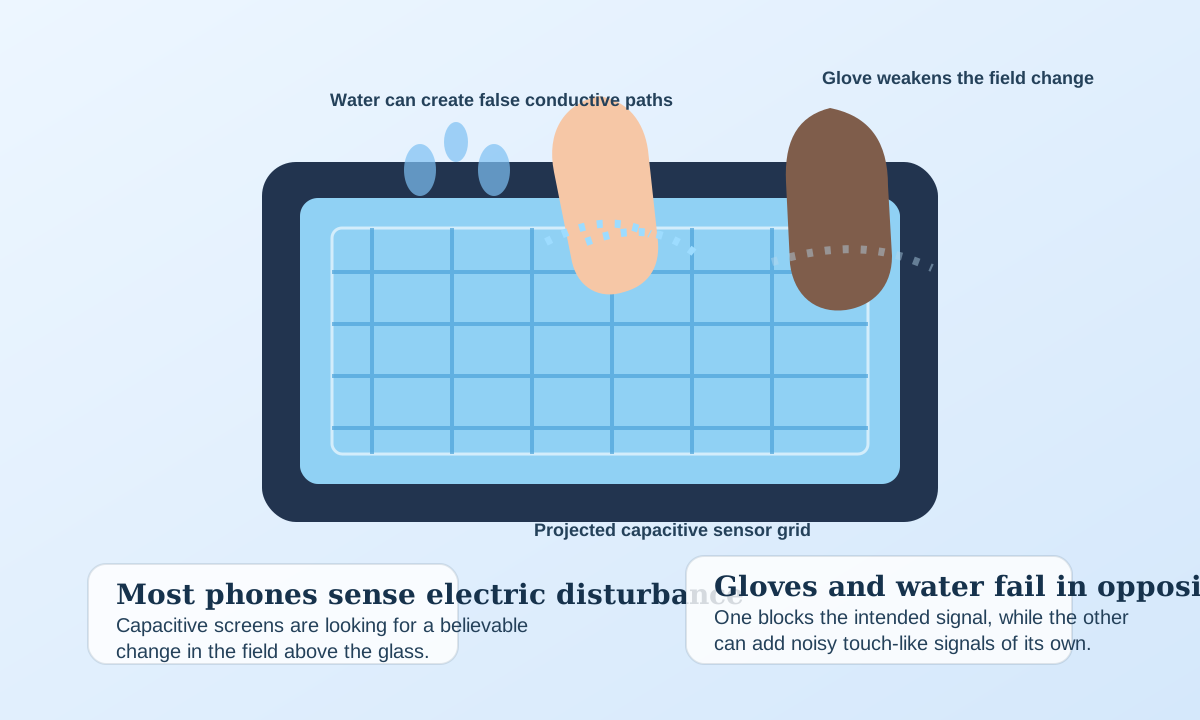
Why do gloves and water confuse a touchscreen in opposite ways?
One problem blocks the intended signal. The other adds too many unintended ones.
Gloves often weaken the signal
A thick nonconductive glove can keep the screen from seeing enough field disturbance to recognize a real touch confidently.
Water can create extra conductive paths
Moisture can mimic part of the touch signature across the glass, which is why wet screens may produce ghost touches or jerky response even when no finger is present.
Good Follow-Up Questions
How do touchscreens work: edge cases and follow-up questions
The short answer helps, but the edge cases, tradeoffs, and scene changes are what usually make the topic memorable.
Pressure is not the whole story
On a capacitive screen, pressing harder does not help if the electrical signal is weak or blocked.
Water can mimic part of the signal
That is why rain, sweat, or a wet countertop can make a touch interface feel erratic.
Touchscreen gloves work by restoring conductivity
Special glove tips use conductive materials so the screen sees something more finger-like through the barrier.
Compare Scenes
Capacitive screens feel effortless when the electrical conditions are clean and frustrating when they are not
Contact shape, conductivity, moisture, and barriers decide how confident the screen is that you really touched it.
Clean strong signal
A normal fingertip on dry glass
The field disturbance is clear enough that the screen can respond quickly and with good positional confidence.
Bare finger
A normal fingertip on dry glass
The field disturbance is clear enough that the screen can respond quickly and with good positional confidence.
Wet screen
A wet screen in the rain
The screen still detects input, but the extra conductive paths can reduce accuracy or create false touches.
Gloves
A thick glove on a phone screen
The touch may be missed entirely because the screen does not see enough field disturbance reaching through the barrier.
Fast Answers
How do touchscreens work? FAQ
Good science pages should answer the obvious follow-ups without making the reader hunt for them.
If your real question is closer to how does wi-fi work?, that page covers the narrower version directly.
If your real question is closer to how does bluetooth work?, that page covers the narrower version directly.
If your real question is closer to how does a microwave work?, that page covers the narrower version directly.
If your real question is closer to how does refrigeration work?, that page covers the narrower version directly.
Trust And Further Reading
Sources and review notes for how do touchscreens work
Reviewed against the listed Future Electronics and Zytronic references for the projected-capacitive sensing, barrier, and moisture explanations used on this page. This page also links outward to trusted references and inward to nearby explainers on the same topic path.
Editorial review
How this page was reviewed
Reviewed against the listed Future Electronics and Zytronic references for the projected-capacitive sensing, barrier, and moisture explanations used on this page.
Further reading
Trusted places to continue learning
Stay In This Topic
More from Everyday Engineering
Signals, circuits, refrigeration, and other engineering ideas hiding in ordinary tools and devices.
A Wi-Fi lab that lets you change closeness, openness, channel crowding, and router quality to compare a strong connection with a frustrating weak one.
Everyday Engineering How do GPS satellites work?A GPS lab that lets you change satellite view, timing quality, sky openness, and reflections to compare an accurate fix with an error-prone one.
Everyday Engineering How does a microwave work?A microwave lab that lets you change power, water content, thickness, and stirring or resting to compare even heating with frustrating cold centers and hot edges.
Everyday Engineering How do microphones work?A microphone lab that lets you change sound level, diaphragm response, magnet strength, and background noise to compare clean voice capture with noisy or overloaded audio.
Related Public Questions
Questions people on the site are also asking
This keeps the explainer connected to the rest of the archive instead of feeling like an isolated page.
No close public question matches are cached yet, but the search page is a good next stop if you want to explore the archive from this starting point.